

Best Gaming Keyboards (2026)
Last updated: June 2026 · As an Amazon Associate, UnknownGear earns from qualifying purchases. Full disclosure.
Welcome back to the one corner of the internet that won't tell you a $250 slab of aluminum will fix your aim. It won't. You're still going to get clapped in the first thirty seconds — just now with a satisfying thock. The gaming keyboard market is 80% RGB, 15% marketing words that mean nothing ("HyperMagnetic," sure buddy), and about 5% genuine engineering. My job is to find that 5% and tell you which boards are worth your rent money.
Here's how I rank: switch quality and feel first, then the stuff that actually wins rounds (Rapid Trigger, polling rate, anti-ghosting), then build, then features you'll use twice and forget. RGB is a tiebreaker, not a selling point. Everything below is sorted into Budget, Mid, and Premium so you can skip straight to your wallet's pain tolerance.
One money-saving trick: The exact same keyboard often costs $30–$50 less in a different colorway or "edition." Brands quietly tax the popular black-on-black look and discount the loud limited runs nobody Instagrammed. Before you check out, click through every color variant on the product page — you're buying the switches and the PCB, not the paint, and the cheapest color performs identically. Free money for the price of owning a slightly goofy pink keyboard.
🆕 What's new this month (June 2026)
- Hall Effect went mainstream and prices finally cracked. Magnetic/analog switches with adjustable actuation and Rapid Trigger used to be a $200 flex; the Keychron K2 HE now drags that tech into mid-range money, and even the flagships have stopped pretending it's exotic.
- 8,000Hz polling is the new spec-sheet flex (Corsair K100), but unless you're on a 360Hz+ monitor you will not feel the jump from 1,000Hz. It's real; it's also mostly bragging rights. Don't let it set the price ceiling for you.
Quick comparison — the top of each tier
| Product | Best for | Key spec | Tier | Our pick |
|---|---|---|---|---|
| SteelSeries Apex Pro TKL Gen 3 | No-compromise competitive | OmniPoint 3.0 Hall Effect, OLED | Premium | 👑 Best overall |
| Razer Huntsman V3 Pro TKL | FPS / Rapid Trigger snobs | Analog optical, 0.1mm reset | Mid-range | 🎯 Best for FPS |
| Keychron K2 HE | Hall Effect on a budget | Magnetic switches, wireless 75% | Mid-range | 💡 Smart buy |
| Logitech G Pro X TKL | Wireless esports minimalism | LIGHTSPEED wireless, TKL | Mid-range | 🎯 Best wireless |
| Redragon K552 | Broke but real | Mechanical, metal plate, TKL | Budget | 💸 Best budget |
👑 Premium — the flagships (where the logo tax lives)
These are excellent. They are also priced like they come with a side of self-respect. You're paying for the best switches money can buy and a tax for the privilege.
SteelSeries Apex Pro TKL Gen 3 — best overall
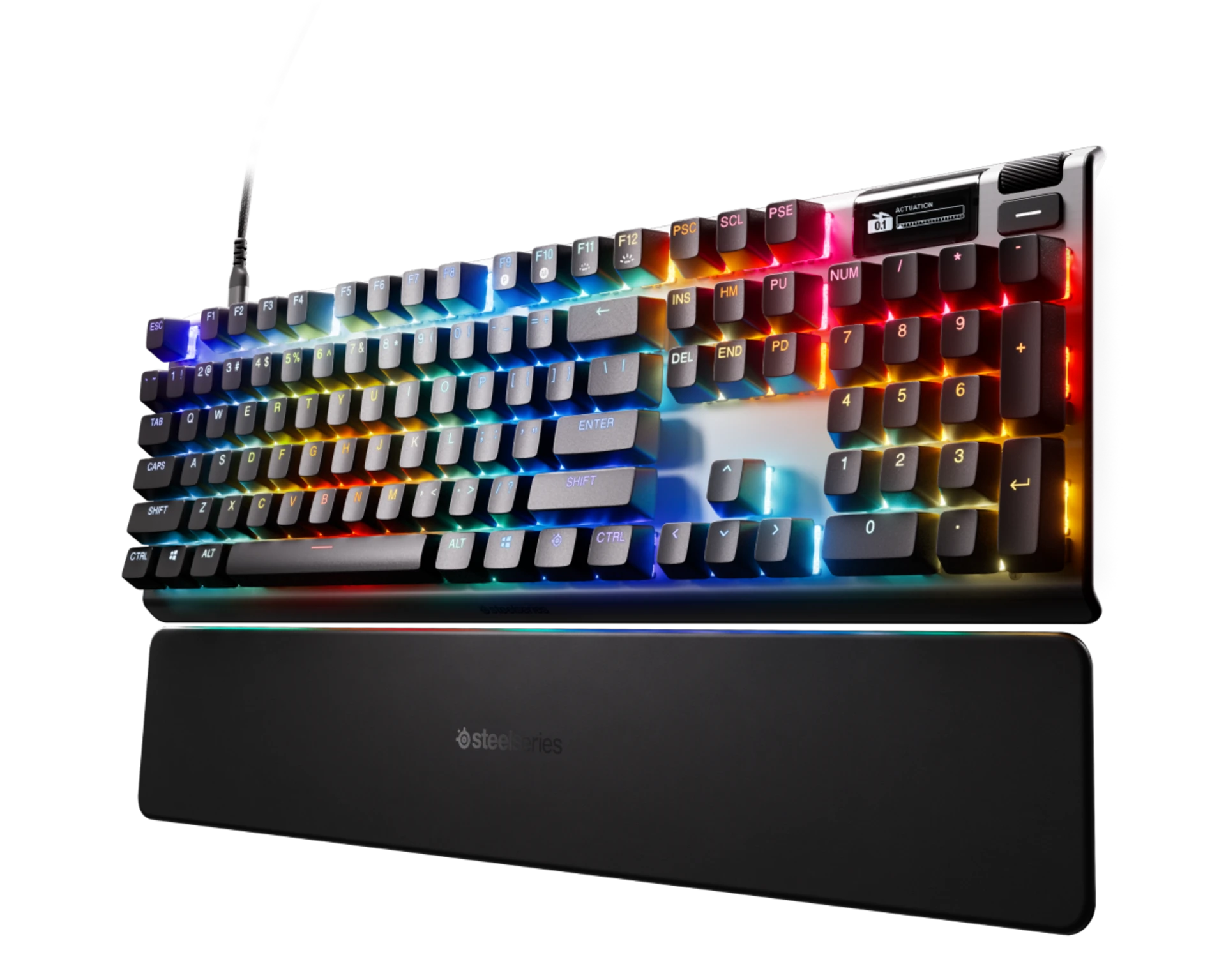
The pitch: The keyboard that does everything, for the player who refuses to admit the keyboard isn't the problem.
The rundown: SteelSeries took its OmniPoint magnetic switches to Gen 3 and gave you 40 levels of adjustable actuation, which is a fancy way of saying you can set the trigger point anywhere from "I sneezed and W pressed" to "I need a gym membership to type." It's got proper Rapid Trigger and Rapid Tap (their Snap-Tap-style SOCD), so your counter-strafing is as crisp as your excuses. The little OLED screen is genuinely useful for swapping profiles and media without alt-tabbing out and dying. Double-shot PBT keycaps, detachable USB-C, aluminum top plate — it's built like it knows it costs as much as a game console. If you only buy one board and want zero regrets, it's this.
Specs: OmniPoint 3.0 Hall Effect switches · 40-level adjustable actuation · Rapid Trigger + Rapid Tap · OLED Smart Display · PBT keycaps · detachable USB-C · TKL · Premium tier
Verdict: ✅ Best-in-class switches, OLED actually useful, tank build · ❌ You will feel the price; software is a lot · 👉 For the player who wants the ceiling and will actually tune the actuation.
Corsair K100 RGB — best full-size flex
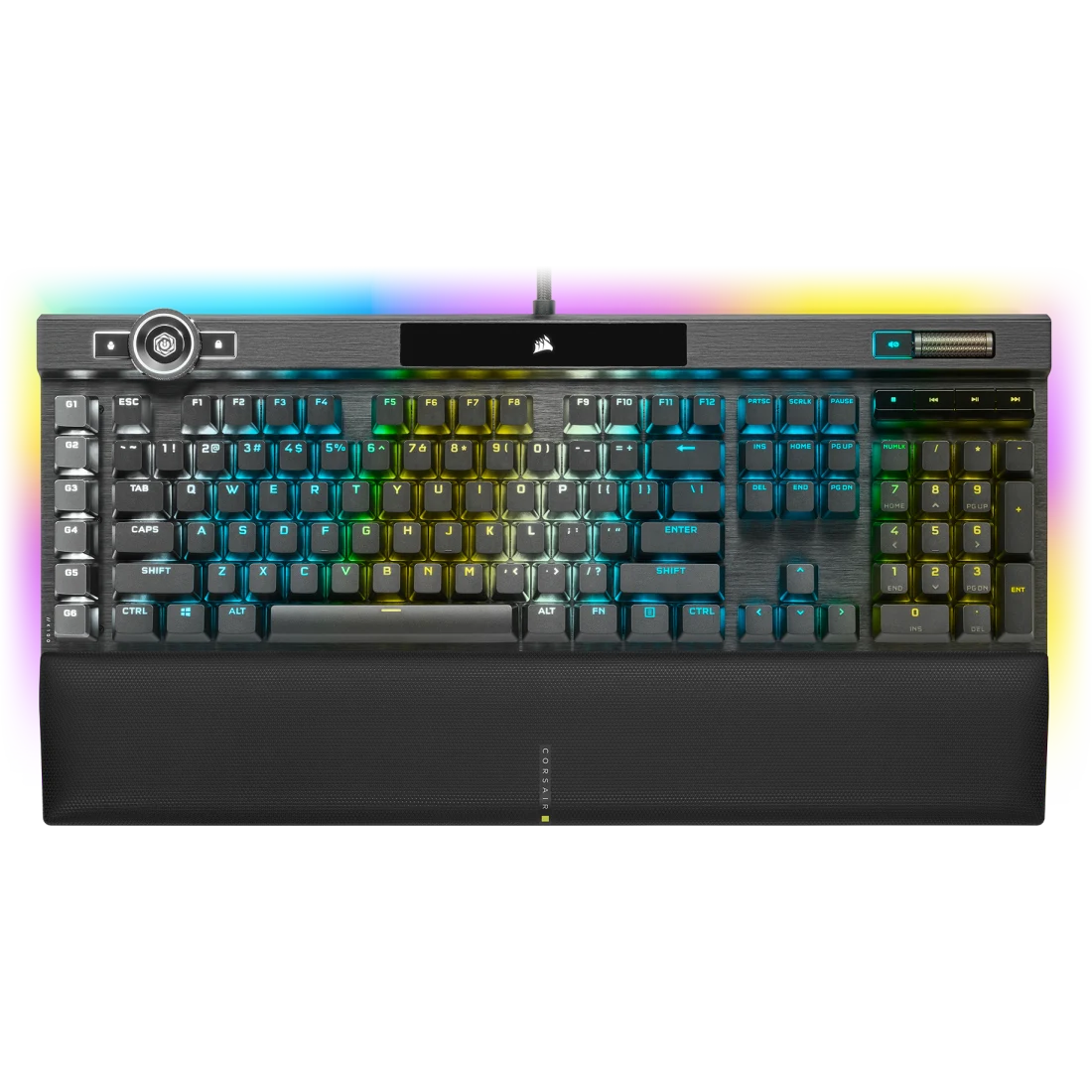
The pitch: A full-size battleship for people who think a number pad and a spinny wheel are personality.
The rundown: The K100 is Corsair throwing the whole catalog at one board — 8,000Hz polling via their AXON processing (real, mostly imperceptible, great at parties), Cherry MX Speed or OPX optical switches with a 1.2mm actuation that triggers if you think about it hard enough, and a dedicated iCUE control wheel that you'll program for volume and never touch again. It's got 44-zone three-sided RGB so blinding that your roommate files a noise complaint about the light. Aluminum frame, dedicated macro keys, a palm rest that's actually comfortable. It is enormous, it is loud in every sense, and it absolutely rips. Just clear some desk space and maybe touch grass afterward.
Specs: Cherry MX Speed / OPX optical switches · up to 8,000Hz polling · iCUE control wheel · 6 dedicated macro keys · 44-zone RGB LightEdge · aluminum frame · full-size · Premium tier
Verdict: ✅ Insane polling, macros galore, premium build · ❌ Huge footprint, iCUE is heavy, price swings wildly · 👉 For full-size diehards who want every bell and every whistle.
🎯 Mid-range — the sweet spot (buy here)
This is where the smart money lives. You get 90% of the flagship for 60% of the price, and nobody on your team can tell the difference because they're too busy missing shots.
Razer Huntsman V3 Pro TKL — best for FPS

The pitch: The Rapid Trigger board the Valorant Reddit won't shut up about — and for once they're right.
The rundown: Razer's Analog Optical Gen-2 switches reset on an upward motion as low as 0.1mm, which means your counter-strafe stops the instant you let off the key instead of a tragic half-beat later. Actuation is adjustable from 0.1 to 4.0mm, so you can run a hair-trigger for movement and a deeper press for stuff you don't want to fat-finger. Snap Tap is on board for SOCD priority (whether that's legal in your game is between you and the anti-cheat). Brushed aluminum plate, doubleshot PBT caps, switches rated for 100 million presses — it'll outlive your interest in ranked. Pure competitive tool; the marketing is insufferable but the hardware delivers.
Specs: Analog Optical Gen-2 switches · 0.1–4.0mm adjustable actuation · 0.1mm Rapid Trigger reset · Snap Tap · 40g force · PBT keycaps · TKL · Mid-range tier
Verdict: ✅ Elite Rapid Trigger, dual actuation, built to last · ❌ Razer tax, Synapse software bloat · 👉 For FPS players who blame the gear and want to stop being right about it.
Logitech G Pro X TKL — best wireless for esports
The pitch: The boring, reliable, pro-endorsed wireless board that just works — the Toyota Camry of keyboards.
The rundown: Logitech's whole pitch here is "we removed everything you don't need." No fancy analog switches, no OLED, no spinny wheel — just rock-solid LIGHTSPEED wireless that's genuinely lag-free, Bluetooth for your laptop, a clean TKL footprint that frees up mouse space for your 180s, and tactile/linear/clicky switch options so you pick your poison. It's the board you see under actual paid professionals because it never drops inputs and never makes them think about it. Is it exciting? No. Will it ever let you down in a clutch? Also no. Sometimes the move is buying the dependable one and spending your energy on, you know, aiming.
Specs: LIGHTSPEED wireless + Bluetooth · GX mechanical switches (tactile/linear/clicky) · TKL · USB-C charging · long battery life · Mid-range tier
Verdict: ✅ Flawless wireless, pro-proven, clean layout · ❌ Feature-bare for the price, no analog · 👉 For competitive players who want wireless they'll never have to think about.
Keychron K2 HE — smartest Hall Effect buy
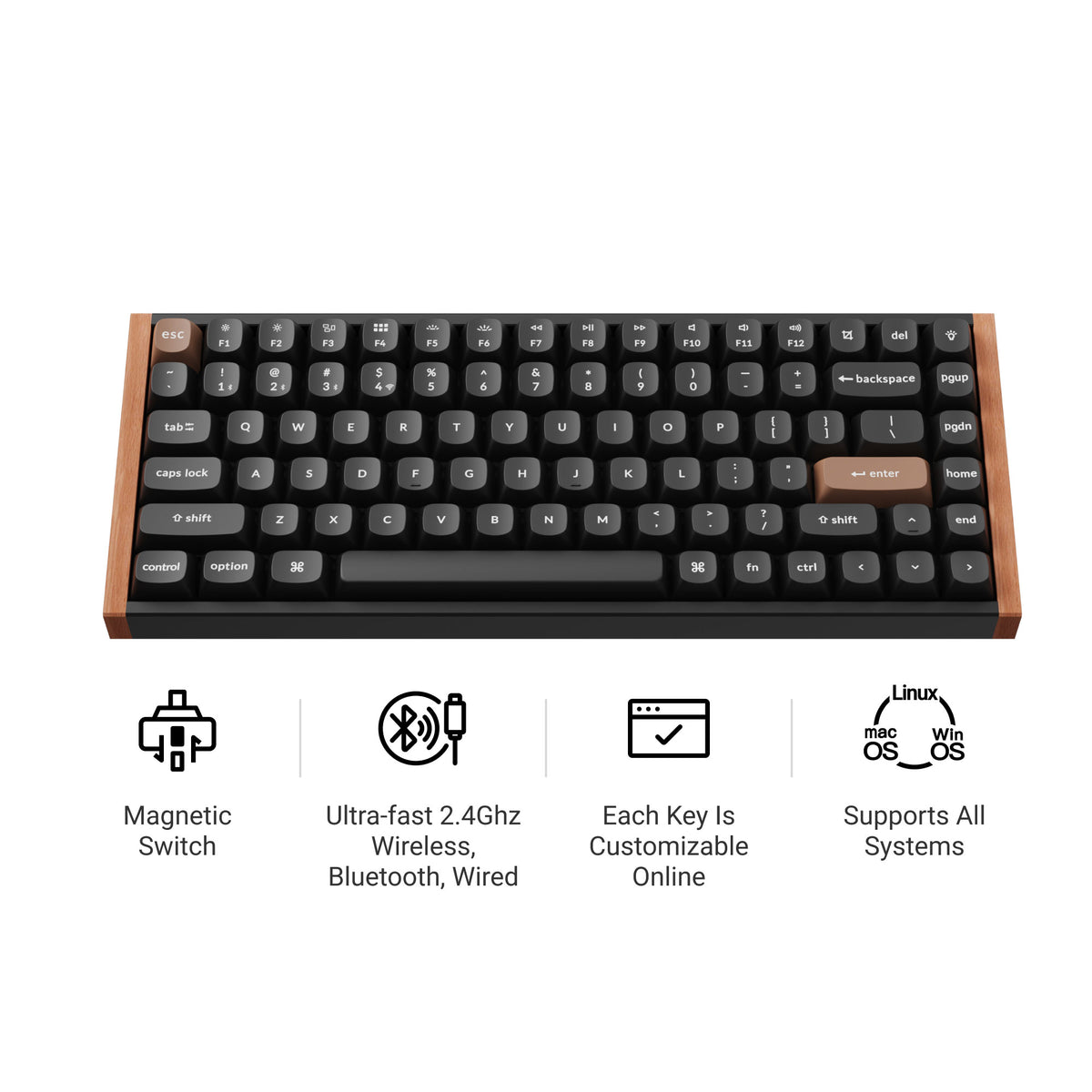
The pitch: Flagship Hall Effect tech at mid-range money, with a build that looks like it costs double.
The rundown: This is the value bomb of the list. The K2 HE packs Gateron double-rail magnetic switches with TMR sensors — adjustable actuation and Rapid Trigger, the same headline tech as the $200 boards — into a 75% wireless layout at mid-range money. It's QMK/VIA programmable so you can remap to your heart's content, hot-swappable so you can chase the switch dragon later, and it comes in genuinely gorgeous aluminum (and fancier wood/resin/concrete) editions. It even snagged a CES Innovation Award, which I'd normally mock, except this time the thing earns it. The one board here that makes the premium flagships sweat about their price tags.
Specs: Gateron double-rail magnetic switches · TMR sensors, adjustable actuation + Rapid Trigger · QMK/VIA · hot-swappable · 2.4GHz + Bluetooth 5.2 · 75% layout · aluminum frame · Mid-range tier
Verdict: ✅ Hall Effect for way less, hot-swap, premium build · ❌ 75% takes adjusting; battery dips with RGB on · 👉 For anyone who wants flagship switch tech without the flagship invoice.
ASUS ROG Strix Scope II 96 Wireless — best battery life
The pitch: A near-full-size board with a number pad that lasts longer on a charge than your ranked grind.
The rundown: The Scope II 96 crams a numpad into a 96% layout so you get all the keys with way less desk, then backs it with up to 1,500 hours of battery (RGB off — turn it on and reality bites, but it's still ages). Tri-mode connectivity means SpeedNova 2.4GHz for gaming, Bluetooth for up to three devices, and wired when you forget to charge it. The ROG NX switches are hot-swappable and pre-lubed from the factory, the stabilizers are surprisingly good out of the box, and there's silicone dampening foam so it sounds expensive. Streamer hotkeys and a multi-function control round it out. A genuinely complete board that doesn't make you choose between a numpad and a clean desk.
Specs: Hot-swappable ROG NX switches (pre-lubed) · tri-mode (SpeedNova 2.4GHz / BT / wired) · up to 1,500h battery · 96% layout w/ numpad · dampening foam · PBT keycaps · Mid-range tier
Verdict: ✅ Marathon battery, numpad + compact, sounds great stock · ❌ Armoury Crate software, RGB tanks battery · 👉 For numpad loyalists who want wireless without constant charging.
Logitech G915 TKL — best low-profile
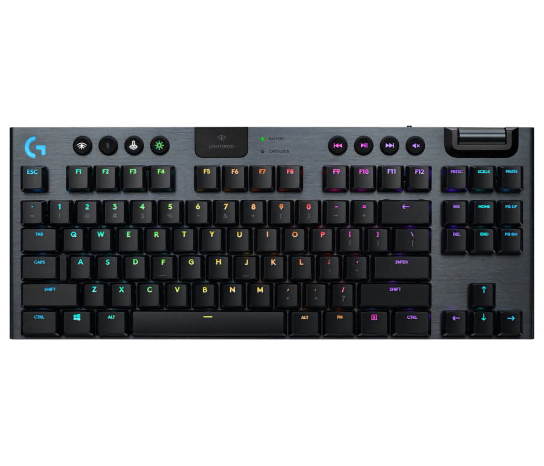
The pitch: For people who think tall mechanical keyboards are a personal attack on their wrists.
The rundown: The G915 TKL is the rare gaming board that looks like it belongs on an adult's desk. Low-profile GL switches give you that satisfying mechanical click-or-thunk in a slab barely thicker than a laptop keyboard, wrapped in a 5052 aluminum top that feels properly premium. LIGHTSPEED wireless is the real deal — genuinely no perceptible lag — plus Bluetooth for typing on your work laptop without anyone knowing you're a gamer. Dedicated media keys and a volume roller are clutch. The catch is it's been around a while, so the price hasn't dropped as much as it should have, and that low-profile feel isn't for everyone. But if a normal mechanical feels like climbing stairs, this is your board.
Specs: Low-profile GL switches (tactile/linear/clicky) · LIGHTSPEED wireless + Bluetooth · 5052 aluminum top · media keys + volume roller · TKL · Mid-range tier
Verdict: ✅ Sleek low-profile feel, premium build, great media controls · ❌ Priced high for its age, low-profile is divisive · 👉 For low-profile fans who want wireless and a desk that looks grown-up.
Razer BlackWidow V4 75% — best hot-swap tinkerer board

The pitch: Razer's gateway drug into the custom-keyboard rabbit hole, no soldering iron required.
The rundown: The BlackWidow V4 75% is Razer noticing that enthusiasts exist and politely asking for their money. It ships with pre-loaded Razer Orange tactile switches, but the socketed PCB takes most standard 3-pin or 5-pin switches, so you can yank them and chase that perfect sound without warranty-voiding surgery. The 75% layout keeps the function row and arrows (the actually-useful keys) while ditching the dead weight. Gasket mounting, sound-dampening foam, and a rotary dial give it real enthusiast cred, and it comes pre-lubed and stabilized so it thocks out of the box. The most "I'm about to spend $300 on artisan keycaps" board on the list — and that's a compliment.
Specs: Razer Orange Tactile Gen-3 switches (hot-swappable, 3/5-pin) · gasket mount · sound-dampening foam · rotary dial · doubleshot keycaps · 75% layout · Mid-range tier
Verdict: ✅ Hot-swap, great stock sound, enthusiast features · ❌ Wired only, Synapse software · 👉 For tinkerers who want a custom-feeling board without building one.
💸 Budget — the broke-but-real picks
You don't need to spend $200 to get a real mechanical keyboard. These two prove that the entry fee to membrane-mush escape is laughably low.
Keychron C3 Pro — best budget enthusiast board

The pitch: A gasket-mounted, QMK-programmable mechanical for the price of a couple of skins. Absurd value.
The rundown: The C3 Pro has no business being this cheap. At budget-tier money you get a gasket-mount structure (the flexy, premium-feeling mount you usually pay triple for), sound-absorbing case foam so it doesn't rattle like a cookie tin, full QMK/VIA programmability for remapping every key, and a clean TKL layout. It's wired, the keycaps are basic ABS, and the RGB is "south-facing and fine," but the typing feel genuinely punches into boards costing four times as much. This is the keyboard you hand to a friend who says "mechanical keyboards are a scam" to permanently shut them up.
Specs: Gasket mount · sound-absorbing foam · QMK/VIA programmable · hot-swap (Pro) · 1000Hz wired · TKL (80%) · Budget tier
Verdict: ✅ Gasket mount + QMK at a steal, great stock sound · ❌ Wired only, basic ABS caps · 👉 For first-time mechanical buyers who want enthusiast feel for pennies.
Redragon K552 — best dirt-cheap mechanical
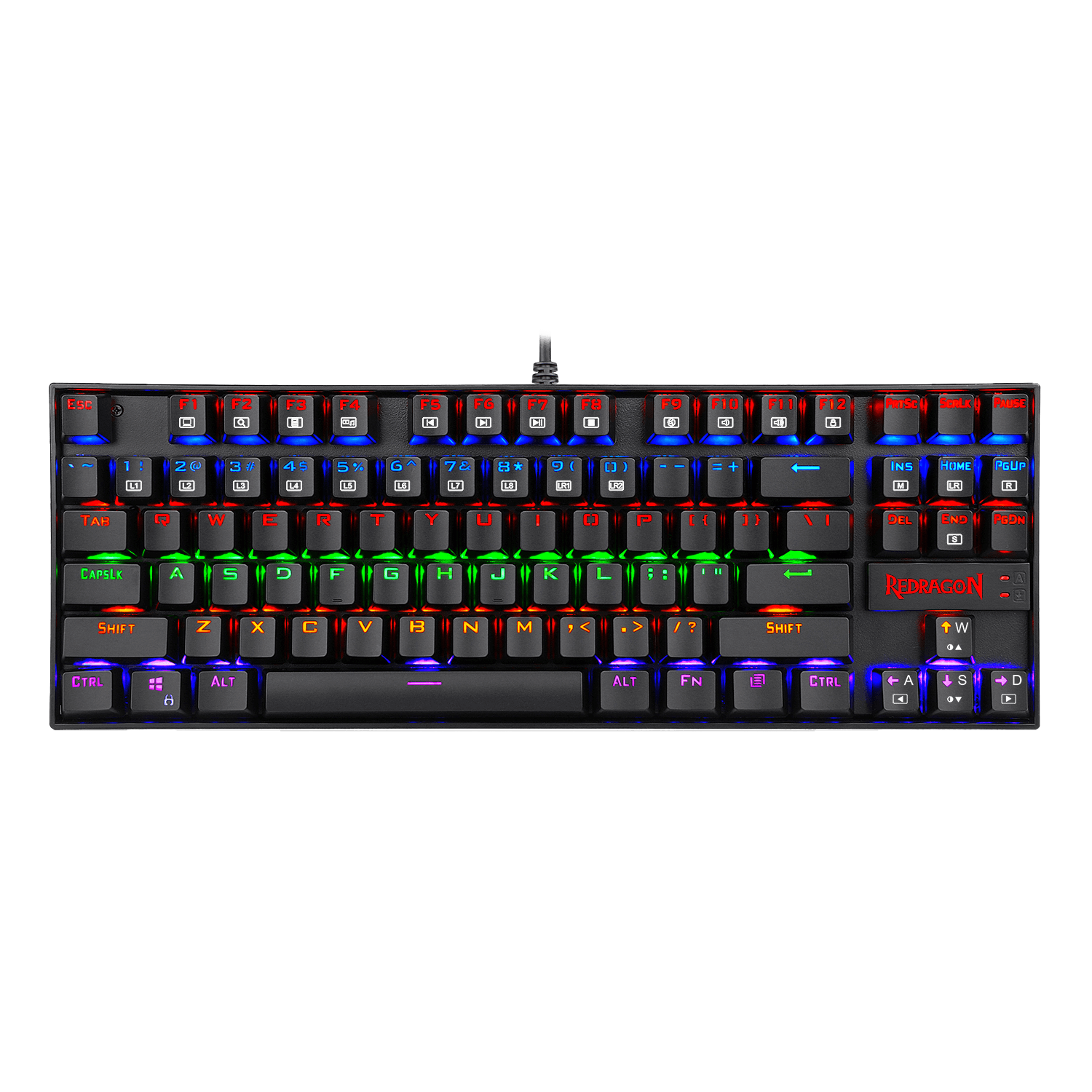
The pitch: The ramen-budget mechanical that has somehow survived every keyboard generation since the dawn of time.
The rundown: The K552 Kumara is the people's champ — a real mechanical keyboard for roughly the cost of a large pizza. You get genuine mechanical switches (Outemu, in clicky blue or quiet red flavors), a metal-alloy top plate that makes it feel weirdly sturdy for the price, full anti-ghosting, and rainbow LED lighting with a pile of effects nobody asked for but everybody enables anyway. The TKL footprint saves desk space, the keycaps are cheap and the software is an afterthought, but as a "I just want to stop using the mushy membrane from 2014" upgrade, nothing touches it. It's been recommended for years for one reason: it refuses to be bad at this price.
Specs: Outemu mechanical switches (blue/red) · metal-alloy top plate · 100% anti-ghosting · rainbow LED backlight · wired · TKL (87-key) · Budget tier
Verdict: ✅ Real mechanical for pizza money, sturdy plate · ❌ Cheap keycaps, basic software, no PBT · 👉 For the broke gamer escaping membrane hell for the first time.
The bottom line
- Best overall: SteelSeries Apex Pro TKL Gen 3 — does everything, regrets nothing.
- Best for FPS: Razer Huntsman V3 Pro TKL — Rapid Trigger that actually moves the needle.
- Smartest buy: Keychron K2 HE — flagship Hall Effect tech without the flagship bill.
- Best wireless: Logitech G Pro X TKL — boringly perfect, pro-proven.
- Best low-profile: Logitech G915 TKL — for grown-up desks and tired wrists.
- Best battery / numpad: ASUS ROG Strix Scope II 96 Wireless — 1,500 hours, full keys, small desk.
- Best tinkerer board: Razer BlackWidow V4 75% — custom feel, no soldering.
- Best budget enthusiast: Keychron C3 Pro — gasket mount + QMK, at budget money.
- Best dirt-cheap: Redragon K552 — real mechanical for pizza money.
Frequently asked questions
Are Hall Effect / magnetic keyboards actually better for gaming?
For competitive FPS, yes — meaningfully. Adjustable actuation and Rapid Trigger let your keys reset the instant you lift, which tightens counter-strafing and movement. For everything else (typing, MMOs, casual play) a good standard mechanical is fine and cheaper. The K2 HE is the easiest way to try Hall Effect without overpaying.
Does polling rate (1,000Hz vs 8,000Hz) matter?
Barely, for most people. 8,000Hz is real and lowers input latency, but unless you're on a 240Hz+ monitor and play at a high level, you will not feel the difference over 1,000Hz. Don't pay a premium chasing it — switch quality and Rapid Trigger matter far more.
What size keyboard should I get — full-size, TKL, or 75%?
TKL (no numpad) is the competitive sweet spot: it frees up mouse space for wide, low-sensitivity swipes. 75% goes even smaller while keeping arrows and the function row. Get full-size only if you genuinely use the numpad (spreadsheets, MMO binds, accounting). For pure gaming, smaller is usually better.
Is it worth buying a $200 keyboard, or is a $50 one fine?
A budget board like the Redragon K552 or Keychron C3 Pro will not lose you games — input lag is similar and they're real mechanicals. You're paying up for adjustable actuation, wireless, better materials (PBT vs ABS, aluminum), and sound. Buy premium for the feel and features, not for a competitive edge that mostly doesn't exist.
What switch type should I pick — linear, tactile, or clicky?
Linear (smooth, no bump) is the popular pick for gaming and is quiet-ish. Tactile gives a feel-it bump for typing accuracy. Clicky is loud and satisfying but your Discord teammates and roommates will file a complaint. When in doubt, linear for gaming, tactile if you type a lot, clicky only if you live alone.
Related: Best Gaming Headsets · Best Gaming Micex